|
Play TFT color screen in three minutes and complete color screen application design in a short time!!!
When it comes to the application of TFT color screens, it is not easy to get started with general level engineering. Even if the display screen can be adjusted to display, the programming for color and image applications is complex, cumbersome, and unstable. The design of the display interface also requires a lot of effort. Now, we introduce an intelligent color screen with a very simple and easy to understand operation method for engineers developing TFT color screens.
For the application of intelligent color screens, simply send instructions without initialization. Equipped with our company's free dedicated development demonstration tool, it can be directly simulated and displayed. Each step of the operation has a log display (i.e. operation instructions), and the instructions can be copied to the tool's \"\"; Write your own instructions; In the command bar, click“ Run” After that, you can see the corresponding effect in the color screen module. If you know how to use the microcontroller, you can use the color screen and play with the TFT color screen in three minutes. It's that simple! It has multiple interface communication, with at least 1 line of communication, saving IO ports.
----For details, please consult QQ: 569582268. Mobile phone: 18938905007,http:\/\/www.trustylcd.comRequest detailed specifications, instruction sheets, and development software.
At present, there are many manufacturers on the market that make serial port screens, but there are few that are truly user-friendly. Our product technology index is at the advanced level of the industry, so you don't need to know. Comparing after use, if you want to quickly complete project research and development, choosing this intelligent color screen can take shortcuts and avoid detours. The following picture is a 7-inch size, with more sizes to choose from, ranging from 1.8 inches to 18.5 inches.
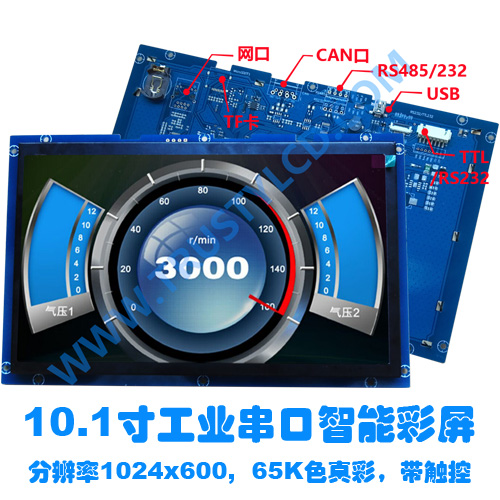
Introduction and explanation of each interface:
TTL\/RS232MCU interface, suitable for secondary development of microcontrollers, is currently the most commonly used interface.
RS485Communication distance is relatively long, with multiple port controls.
CANMainly used in some professional high-speed communication equipment, especially commonly used in automotive electronics.
Ethernet portConventional Ethernet interfaces can control communication between up to 128 independent display terminals over long distances through a host computer, and communication and power supply can be achieved through POE technology with just one Ethernet cable, making installation and wiring more convenient and reliable for users.
USB: mainly used for fast online image download and can also be used as a communication interface. The download speed is hundreds of times faster than RS232, making it currently the fastest download method.
\tTFcardSuitable for batch offline download on production lines, no need for a computer, just plug in the TF card to download, and unplug it after successful download.
Our product has the following characteristics and advantages:
Practicality: This series of products belongs to our mature technology products, with simple operation and high cost-effectiveness. The instruction set and debugging assistant software are universal to all TFT intelligent color screen modules of our company, making it convenient for customers to upgrade products of different specifications without changing programs and interfaces.
Color saturation: 65K colors, 16 bit RGB true color display (can also be made into 24 bit 16.7M colors).
Baud rate: Supports a baud rate range of 2400-112200 bps.
Storage capacity: 128MB FLASH storage space (at least 160 800 * 480 pixel images can be stored), and additional storage space can be increased according to customer requirements.
With font library: Built in 8 standard font libraries, supporting ASCII code, Simplified Chinese GB2312, and Traditional Chinese BIG5. Font sizes are 12 * 12, 16 * 16, 24 * 24, 32 * 32 or larger, usually in Song typeface, but can also be downloaded to customize any window font library according to customer requirements.
Download method: During the sample period, download via RS232 or USB online. For batch production on the production line, images can be downloaded offline using a TF card.
Communication interface: Conventional products use RS232\/TL232 serial ports, as well as USB, CAN high-speed interfaces, network interfaces, and various video interfaces AV, VGA, and HDMI.
Image format: Supports downloading image formats such as BMP, JPG, PNG, TIF, GIF, etc.
Display mode: Supports displaying images of any size, image cropping, layer switching, layer copying, layer overlay, and displaying icons at any position.
Backlight adjustment: supports software control, with 0-100 levels of backlight brightness adjustment.
Text display: Supports text display at any position and multiple text display effects.
Perspective direction: Supports landscape or portrait display, suitable for various perspective applications.
Auditory function: equipped with buzzer, software controllable.
Common features: Supports common GUI functions such as drawing points, lines, circles, rectangles, and polygons.
Screen saver mode: The sleep and wake-up commands are controlled separately.
Clock function: Supports RTC clock (with 1220 or 3220 button battery holder, without button battery).
Drive voltage: Normally 5.0V, it can be set to 3.3V (below 5 inches), 5V~12V, 5V~24V and other wide voltage supplies according to customer requirements before shipment.
On demand customization: Meet all achievable needs of users.
TP touch screen: With super large touch functions and simple touch applications, it can directly set the touch button interface, freely set touch attributes, and store touch functions in FLASH without the need for user MCU programs to participate. It can achieve functions such as screen jumping, switch pressing and popping up, and custom command data strings (button numbers). If a button is pressed, the display screen will directly upload the command parameters of that button without the need to determine the coordinate values.
|